// Studio guide — introduction for new users: hero, a scrolling strip of real
// catalog items, "Gear at a Glance" feature cards and a screenshot walkthrough
// of each part of the app. Shown once after a new user's first sign-in, from
// the sidebar (Guide), and from the login page before signing up.
//
// Screenshots live in /guide and show a demo studio built from real catalog
// items. Phones get MobileGuidePage instead: portrait screenshots of the
// phone layout (/guide/mobile) and a list of what the desktop adds. Also
// exports ItemMarquee, used on the login page.
(function () {
  const { useState, useMemo, useEffect } = React;
  const S = window.STUDIO_STYLES;
  const T = S.T;

  // Grey dot grid on black, as on the home page.
  const DOTS = { backgroundColor: T.ink, backgroundImage: 'radial-gradient(circle, rgba(255,255,255,0.08) 1px, transparent 1px)', backgroundSize: '22px 22px' };

  // ── Scrolling strip of random catalog items ────────────────────────────
  // Real gear only (cameras, lenses, lights, support, audio, monitors), a
  // fresh random mix on every visit. To show instantly on load, the strip
  // starts from the set picked on the previous visit (kept in localStorage)
  // and otherwise builds as soon as the catalog arrives, without waiting for
  // photos. Purely decorative: no hover or click, and it stands still for
  // people who prefer less motion.
  const SHOWCASE_ROLES = new Set(['body', 'lens', 'light', 'gimbal', 'monitor', 'mic-xlr', 'mic', 'tripod', 'xlr-input']);
  const MARQUEE_KEY = 'gear.marquee';
  let marqueeSet = null; // shared across pages so it doesn't reshuffle mid-visit
  try { const c = JSON.parse(localStorage.getItem(MARQUEE_KEY) || 'null'); if (Array.isArray(c) && c.length >= 8) marqueeSet = c; } catch (e) {}
  let marqueeRefreshed = false;

  function pickMarquee(items, count) {
    const C = window.GEAR_COMPAT;
    const pool = items.filter(it => it.image_url && (!C || SHOWCASE_ROLES.has(C.specOf(it).role)));
    for (let i = pool.length - 1; i > 0; i--) {
      const j = Math.floor(Math.random() * (i + 1));
      [pool[i], pool[j]] = [pool[j], pool[i]];
    }
    return pool.slice(0, count).map(it => ({ id: it.id, name: it.name, image_url: it.image_url }));
  }

  function ItemMarquee({ items = [], count = 32, dark = false }) {
    const [shown, setShown] = useState(marqueeSet);
    useEffect(() => {
      if (marqueeRefreshed || items.length < 50) return;
      marqueeRefreshed = true;
      const next = pickMarquee(items, count);
      if (next.length < 8) return;
      if (!marqueeSet) { marqueeSet = next; setShown(next); }
      // Save a fresh mix for the next visit; preload its photos so they're cached.
      try { localStorage.setItem(MARQUEE_KEY, JSON.stringify(next)); } catch (e) {}
      next.forEach(it => { const img = new Image(); img.src = it.image_url; });
    }, [items.length]);
    if (!shown) return <div style={{ height: 150 }} />;
    const tile = 112;
    const seconds = Math.round(shown.length * (tile + 12) / 45);
    return (
      <div aria-hidden="true" style={{ overflow: 'hidden', width: '100%', pointerEvents: 'none', userSelect: 'none', maskImage: 'linear-gradient(90deg, transparent, #000 6%, #000 94%, transparent)', WebkitMaskImage: 'linear-gradient(90deg, transparent, #000 6%, #000 94%, transparent)' }}>
        <style>{`
          @keyframes gearMarquee { from { transform: translate3d(0, 0, 0); } to { transform: translate3d(-50%, 0, 0); } }
          @media (prefers-reduced-motion: reduce) { .gear-marquee-track { animation: none !important; } }
        `}</style>
        <div className="gear-marquee-track" style={{ display: 'flex', width: 'max-content', padding: '4px 0', animation: `gearMarquee ${seconds}s linear infinite`, willChange: 'transform' }}>
          {[0, 1].map(copy => shown.map(it => (
            <div key={copy + it.id} style={{ width: tile, flexShrink: 0, marginRight: 12 }}>
              <div style={{ width: tile, height: tile, background: '#fff', border: dark ? '1px solid rgba(255,255,255,0.08)' : `1px solid ${T.paperEdge}`, display: 'flex', alignItems: 'center', justifyContent: 'center', padding: 10, boxSizing: 'border-box' }}>
                <img src={it.image_url} alt="" draggable="false" onError={e => { e.currentTarget.style.visibility = 'hidden'; }} style={{ maxWidth: '100%', maxHeight: '100%', objectFit: 'contain' }} />
              </div>
              <div style={{ marginTop: 6, fontSize: 10, lineHeight: 1.3, fontFamily: S.mono, color: dark ? 'rgba(255,255,255,0.55)' : T.textMute, display: '-webkit-box', WebkitLineClamp: 2, WebkitBoxOrient: 'vertical', overflow: 'hidden', height: 26 }}>
                {it.name}
              </div>
            </div>
          )))}
        </div>
      </div>
    );
  }

  // ── Content ────────────────────────────────────────────────────────────
  // In sidebar order, so the guide mirrors the app's navigation.
  const FEATURES = [
    { icon: '▣', page: 'inventory', title: 'Build your inventory', text: 'Add gear from a database of thousands of items. Track quantities and status, and group kit that travels together.' },
    { icon: '✧', page: 'suggest', title: 'Let AI build the kit', text: 'Describe the shoot and get a kit list that works together. Mounts, batteries, media, monitoring and gimbal payload are checked for you. Then ask for changes in plain English.' },
    { icon: '◎', page: 'discover', title: 'Discover new gear', text: 'Hand-picked new releases from across the industry, explained: what’s new, the key specs and what it costs.' },
    { icon: '◈', page: 'database', title: 'Search the database', text: 'Filter cameras, lenses, lighting, audio and support by category, then add items to your inventory or straight into a project.' },
    { icon: '◧', page: 'projects', title: 'Sort your items into projects', text: 'Prep for each shoot by adding items, or whole groups, to a project. Adjust quantities, track its status and export a PDF pull list.' },
  ];

  // In sidebar order; the project view and PDF export follow Projects.
  const WALKTHROUGH = [
    {
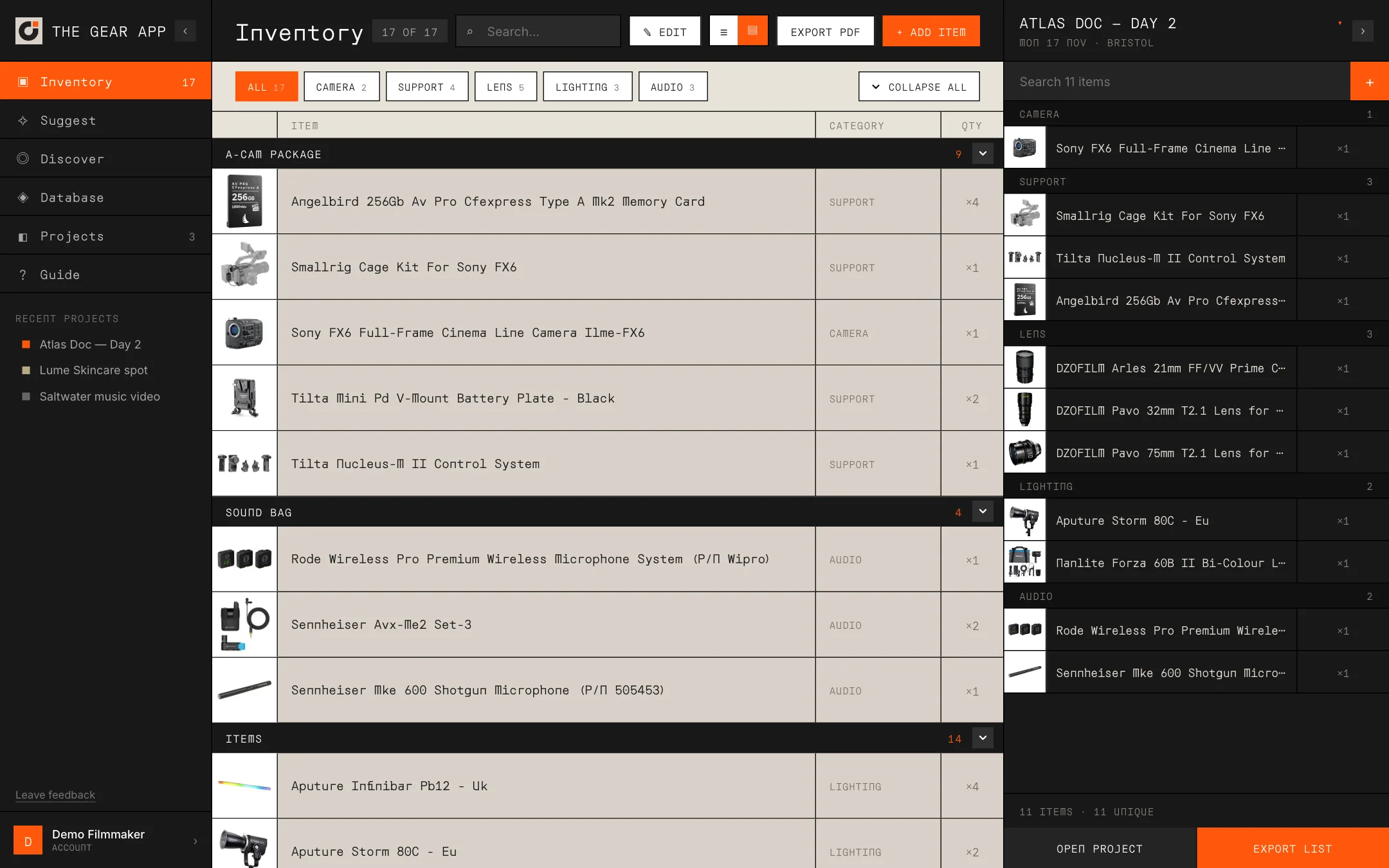
      img: 'guide/inventory.webp', page: 'inventory', label: 'Inventory', title: 'Your kit, organised',
      text: 'Everything you own in one list, with the project you’re prepping open alongside it.',
      points: [
        'Add items from the database of thousands of cameras, lenses, lights and more.',
        'Select items and move them into a group, like an A-Cam package or a sound bag.',
        'Track how many you own and whether each is available, checked out or in for repair.',
        'Add items, or a whole group, to a project.',
      ],
    },
    {
      img: 'guide/suggest.webp', page: 'suggest', label: 'Suggest', title: 'Let AI build the kit',
      text: 'Describe the shoot in plain English and get a kit list in under a minute.',
      points: [
        'Every item is checked against the camera: lens mounts and adapters, sensor coverage, batteries, media, monitor connections, gimbal payload and XLR audio.',
        'Anything missing comes with one-click fixes from the database.',
        'Ask for changes, like “swap to a lighter camera for the gimbal”, and undo them.',
        'History keeps every kit, and you can save one as a new project.',
      ],
    },
    {
      img: 'guide/discover.webp', page: 'discover', label: 'Discover', title: 'What’s new in gear',
      text: 'A hand-picked feed of new releases from across the industry, kept up to date.',
      points: [
        'Each pick explains what’s new, with key specs, price and the date it was announced.',
        'Open a pick for the full write-up and a link to the original announcement.',
        'Add picks that are already in the database straight to your inventory.',
      ],
    },
    {
      img: 'guide/database.webp', page: 'database', label: 'Database', title: 'Thousands of items, one search',
      text: 'Cameras, lenses, lighting, audio and support, all with pictures.',
      points: [
        'Search by name and narrow it down by category.',
        'Add anything to your inventory in one click.',
        'Or add it straight to a project when you’re hiring it in.',
      ],
    },
    {
      img: 'guide/projects.webp', page: 'projects', label: 'Projects', title: 'A project for every shoot',
      text: 'Each card shows the client, dates, location and the kit going out.',
      points: [
        'Create a project per shoot and keep its kit list in one place.',
        'See every project’s gear at a glance.',
        'Track status from planning to active to wrapped.',
      ],
    },
    {
      img: 'guide/project.webp', page: 'projects', label: 'Project', title: 'The full kit list',
      text: 'Open a project for the complete list, grouped by category with quantities.',
      points: [
        'Adjust quantities and the project’s status in edit mode.',
        'Jump to recent projects from the sidebar.',
      ],
    },
    {
      img: 'guide/export.webp', page: 'projects', label: 'Export', title: 'Export a pull list',
      text: 'Download a PDF of any project or your whole inventory.',
      points: [
        'Include photos and category headings, in a compact or spacious layout.',
        'Share it with crew, rental houses or insurers.',
        'Pro exports carry your own company name instead of The Gear App’s.',
      ],
    },
  ];

  // Phone guide: portrait screenshots of the phone app (guide/mobile, taken
  // in iPhone Safari with the same demo studio), in tab order.
  const MOBILE_WALKTHROUGH = [
    {
      img: 'guide/mobile/inventory.webp', page: 'inventory', label: 'Inventory', title: 'Your kit in your pocket',
      text: 'Everything you own, in the groups you use on set.',
      points: ['Search your gear or filter by category.', 'Groups like an A-Cam package or a sound bag keep kit together.', 'Tap + to add more from the database.'],
    },
    {
      img: 'guide/mobile/item.webp', page: 'inventory', label: 'Item', title: 'Tap any item',
      text: 'One sheet for everything about a piece of kit.',
      points: ['Change how many you own and edit its details.', 'Move it into a group, or start a new one.', 'Add it to any project, and see how many are already on each list.'],
    },
    {
      img: 'guide/mobile/projects.webp', page: 'projects', label: 'Projects', title: 'A project for every shoot',
      text: 'Client, dates, location and the kit going out, at a glance.',
      points: ['Create a project per shoot.', 'Status shows what’s planning, active or wrapped.'],
    },
    {
      img: 'guide/mobile/project.webp', page: 'projects', label: 'Kit list', title: 'The kit list on the day',
      text: 'The full list, grouped by category, ready for prep at the rental counter.',
      points: ['Change quantities with + and −.', 'Switch the status or rename the project with a tap.'],
    },
    {
      img: 'guide/mobile/addgear.webp', page: 'projects', label: 'Add gear', title: 'Add from your gear or the database',
      text: 'Fill a project from what you own, or from thousands of catalog items when you’re hiring in.',
      points: ['Search either list and tap + to add.', 'The count shows what’s already on the list.'],
    },
    {
      img: 'guide/mobile/suggest.webp', page: 'suggest', label: 'Suggest', title: 'Describe the shoot, get a kit',
      text: 'AI builds a kit list from the database and checks that it works together.',
      points: ['Mounts, batteries, media, monitoring and audio are checked for you.', 'Ask for changes in plain English.', 'Add it to a project or save it as a new one.'],
    },
    {
      img: 'guide/mobile/database.webp', page: 'database', label: 'Database', title: 'Thousands of items, one search',
      text: 'Cameras, lenses, lighting, audio and support, all with pictures.',
      points: ['Filter by category and add to your inventory in one tap.'],
    },
    {
      img: 'guide/mobile/export.webp', page: 'projects', label: 'Export', title: 'Send the pull list',
      text: 'Make a PDF of any project right from your phone.',
      points: ['Choose photos, category headings and a compact or spacious layout.', 'Share it to WhatsApp, Mail or AirDrop, or save it to Files.'],
    },
  ];

  // Only what the desktop version adds; keep in step with the phone layout
  // (studio-mobile.jsx) so this list stays true.
  const WEB_EXTRAS = [
    ['Drag and drop', 'Drag items, or whole groups, straight into a project, with its kit list open alongside your inventory.'],
    ['Faster organising', 'Select many items at once, move them between groups in one go, and rename or delete groups.'],
    ['Inventory PDF', 'Export your whole inventory as a PDF, with a full-page preview of the sheet.'],
    ['Bigger views', 'Sortable database columns, compact and spacious rows, and undo (⌘Z) for deleted items, groups and projects.'],
  ];

  const STEPS = [
    ['Add your gear', 'Search the database and add what you own.'],
    ['Create a project', 'One per shoot, with client, dates and location.'],
    ['Fill it', 'Add gear, or let Suggest build the kit for you.'],
  ];

  function Screenshot({ src, alt, onOpen }) {
    return (
      <div onClick={onOpen} style={{ overflow: 'hidden', border: `1px solid ${T.paperEdge}`, boxShadow: '0 18px 40px rgba(25,25,25,0.14)', background: '#fff', cursor: 'zoom-in' }}>
        <div style={{ height: 28, background: '#ece6dc', display: 'flex', alignItems: 'center', gap: 6, padding: '0 12px', borderBottom: `1px solid ${T.paperEdge}` }}>
          {['#ff5f57', '#febc2e', '#28c840'].map(c => <span key={c} style={{ width: 9, height: 9, borderRadius: '50%', background: c }} />)}
          <span style={{ marginLeft: 10, fontFamily: S.mono, fontSize: 10, color: T.textMute, background: '#f6f3ee', padding: '2px 10px' }}>gearapp.io</span>
        </div>
        <img src={src} alt={alt} loading="lazy" style={{ display: 'block', width: '100%', height: 'auto', aspectRatio: '16 / 10' }} />
      </div>
    );
  }

  function GuidePage({ onNavigate, onClose, onCreateAccount, closeLabel, catalog, items = [] }) {
    const [zoom, setZoom] = useState(null);
    useEffect(() => {
      if (!zoom) return;
      const onKey = (e) => { if (e.key === 'Escape') setZoom(null); };
      window.addEventListener('keydown', onKey);
      return () => window.removeEventListener('keydown', onKey);
    }, [zoom]);
    const free = catalog && catalog.plans && catalog.plans.free;
    const pro = catalog && catalog.plans && catalog.plans.pro;
    const B = window.GEAR_BILLING;

    return (
      <div style={{ flex: 1, overflowY: 'auto', background: T.paper }}>
        {/* Hero */}
        <div style={{ position: 'relative', ...DOTS, color: '#fff', padding: '56px 0 40px', textAlign: 'center', overflow: 'hidden' }}>
          {onClose && (
            <button onClick={onClose} style={{ position: 'absolute', top: 18, right: 22, zIndex: 1, background: 'rgba(255,255,255,0.08)', border: '1px solid rgba(255,255,255,0.15)', color: '#fff', padding: '7px 12px', cursor: 'pointer', fontFamily: S.mono, fontSize: 11, letterSpacing: '0.06em', textTransform: 'uppercase' }}>
              {closeLabel || 'Close'}
            </button>
          )}
          <div style={{ padding: '0 40px' }}>
            <img src="app-icon.jpg" alt="" style={{ width: 56, height: 56, borderRadius: 12, marginBottom: 22 }} />
            <div style={{ fontFamily: S.sans, fontSize: 'clamp(36px, 5vw, 60px)', fontWeight: 700, letterSpacing: '-0.035em', lineHeight: 1.02 }}>All your gear,<br />in one place.</div>
            <div style={{ fontSize: 16, color: 'rgba(255,255,255,0.6)', maxWidth: 520, margin: '18px auto 0', lineHeight: 1.55 }}>
              Organise your equipment, track your inventory and prep for every shoot.
            </div>
          </div>
          <div style={{ marginTop: 40 }}>
            <ItemMarquee items={items} dark />
          </div>
        </div>

        <div style={{ maxWidth: 1040, margin: '0 auto', padding: '48px 28px 72px' }}>
          {/* Features */}
          <div style={{ textAlign: 'center', marginBottom: 28 }}>
            <div style={{ fontFamily: S.mono, fontSize: 26, fontWeight: 700, letterSpacing: '-0.02em' }}>Gear at a Glance</div>
            <div style={{ fontSize: 14, color: T.textMute, marginTop: 8 }}>Everything you need to prep a shoot, from your shelf to the call sheet.</div>
          </div>
          <div style={{ display: 'grid', gridTemplateColumns: 'repeat(auto-fill, minmax(270px, 1fr))', gap: 14 }}>
            {FEATURES.map(f => (
              <div key={f.title} style={{ background: '#fff', border: `1px solid ${T.paperEdge}`, padding: 20, display: 'flex', flexDirection: 'column', gap: 10 }}>
                <div style={{ width: 36, height: 36, background: '#fff3ed', color: T.orange, display: 'flex', alignItems: 'center', justifyContent: 'center', fontSize: 17 }}>{f.icon}</div>
                <div style={{ fontWeight: 700, fontSize: 15, color: T.ink }}>{f.title}</div>
                <div style={{ fontSize: 13, color: T.textMute, lineHeight: 1.55, flex: 1 }}>{f.text}</div>
                {onNavigate && (
                  <button onClick={() => onNavigate(f.page)} style={linkBtn}>Open {f.page} →</button>
                )}
              </div>
            ))}
            {free && pro && (
              <div style={{ ...DOTS, color: '#fff', padding: 20, display: 'flex', flexDirection: 'column', gap: 10 }}>
                <div style={{ width: 36, height: 36, background: 'rgba(255,87,12,0.18)', color: T.orange, display: 'flex', alignItems: 'center', justifyContent: 'center', fontSize: 17 }}>✦</div>
                <div style={{ fontWeight: 700, fontSize: 15 }}>Free to start</div>
                <div style={{ fontSize: 13, color: 'rgba(255,255,255,0.65)', lineHeight: 1.55 }}>
                  Free includes {free.max_projects} projects, {free.max_inventory_items} inventory items and {free.monthly_credits} AI kit builds a month.
                  Pro ({B.money(pro.price_pence, pro.currency)}/month) removes the limits and gives you {pro.monthly_credits} builds a month.
                </div>
              </div>
            )}
          </div>

          {/* Walkthrough */}
          <div style={{ textAlign: 'center', margin: '72px 0 8px' }}>
            <div style={{ fontFamily: S.mono, fontSize: 26, fontWeight: 700, letterSpacing: '-0.02em' }}>A closer look</div>
            <div style={{ fontSize: 14, color: T.textMute, marginTop: 8 }}>How each part of the app works. Click any screenshot to see it full size.</div>
          </div>
          {WALKTHROUGH.map((w, i) => (
            <div key={w.img} style={{ display: 'flex', flexWrap: 'wrap', flexDirection: i % 2 ? 'row-reverse' : 'row', alignItems: 'center', gap: 40, marginTop: 56 }}>
              <div style={{ flex: '1 1 320px', minWidth: 0 }}>
                <div style={{ ...S.label, color: T.orange }}>{String(i + 1).padStart(2, '0')} · {w.label}</div>
                <div style={{ fontFamily: S.mono, fontSize: 22, fontWeight: 700, letterSpacing: '-0.02em', margin: '8px 0 10px' }}>{w.title}</div>
                <div style={{ fontSize: 14, color: T.textMute, lineHeight: 1.6 }}>{w.text}</div>
                <ul style={{ margin: '14px 0 0', padding: 0, listStyle: 'none', display: 'flex', flexDirection: 'column', gap: 8 }}>
                  {w.points.map(p => (
                    <li key={p} style={{ display: 'flex', gap: 10, fontSize: 13, color: T.ink, lineHeight: 1.55 }}>
                      <span style={{ color: T.orange, fontFamily: S.mono, fontWeight: 700, flexShrink: 0 }}>✓</span>{p}
                    </li>
                  ))}
                </ul>
                {onNavigate && <button onClick={() => onNavigate(w.page)} style={{ ...linkBtn, marginTop: 16 }}>Open {w.page} →</button>}
              </div>
              <div style={{ flex: '1.6 1 420px', minWidth: 0 }}>
                <Screenshot src={w.img} alt={`${w.label} screen`} onOpen={() => setZoom(w)} />
              </div>
            </div>
          ))}

          {/* Getting started */}
          <div style={{ marginTop: 72, background: '#fff', border: `1px solid ${T.paperEdge}`, padding: '24px 26px' }}>
            <div style={{ ...S.label, marginBottom: 16 }}>Get started in three steps</div>
            <div style={{ display: 'grid', gridTemplateColumns: 'repeat(auto-fill, minmax(220px, 1fr))', gap: 18 }}>
              {STEPS.map(([title, text], i) => (
                <div key={title} style={{ display: 'flex', gap: 12 }}>
                  <div style={{ width: 26, height: 26, background: T.ink, color: '#fff', display: 'flex', alignItems: 'center', justifyContent: 'center', fontFamily: S.mono, fontSize: 12, fontWeight: 700, flexShrink: 0 }}>{i + 1}</div>
                  <div>
                    <div style={{ fontWeight: 600, fontSize: 14 }}>{title}</div>
                    <div style={{ fontSize: 12, color: T.textMute, marginTop: 3, lineHeight: 1.5 }}>{text}</div>
                  </div>
                </div>
              ))}
            </div>
            {onNavigate ? (
              <button onClick={() => onNavigate('database')} style={{ ...S.btnP, marginTop: 22, padding: '11px 18px' }}>Start adding gear</button>
            ) : onCreateAccount ? (
              <button onClick={onCreateAccount} style={{ ...S.btnP, marginTop: 22, padding: '11px 18px' }}>Create a free account</button>
            ) : null}
          </div>
          <div style={{ marginTop: 14, fontSize: 11, color: T.textMute, fontFamily: S.mono, textAlign: 'center' }}>Screenshots show a demo account.</div>
        </div>

        {zoom && (
          <div onClick={() => setZoom(null)} role="dialog" aria-label={`${zoom.label} screenshot`}
            style={{ position: 'fixed', inset: 0, zIndex: 500, background: 'rgba(12,12,12,0.86)', display: 'flex', alignItems: 'center', justifyContent: 'center', padding: 32, cursor: 'zoom-out' }}>
            <img src={zoom.img} alt={`${zoom.label} screen`} style={{ maxWidth: '100%', maxHeight: '100%', boxShadow: '0 24px 60px rgba(0,0,0,0.5)' }} />
          </div>
        )}
      </div>
    );
  }

  const linkBtn = { alignSelf: 'flex-start', background: 'none', border: 'none', padding: 0, color: T.orange, fontFamily: S.mono, fontSize: 11, fontWeight: 600, letterSpacing: '0.06em', textTransform: 'uppercase', cursor: 'pointer' };

  // ── Phone guide ─────────────────────────────────────────────────────────
  // Same story as GuidePage, told with the phone app: one column of portrait
  // screenshots in a phone frame, then what the desktop version adds.
  function MobileGuidePage({ onNavigate, onClose, onCreateAccount, closeLabel, catalog, items = [] }) {
    const [zoom, setZoom] = useState(null);
    const free = catalog && catalog.plans && catalog.plans.free;
    const pro = catalog && catalog.plans && catalog.plans.pro;
    const B = window.GEAR_BILLING;

    return (
      <div style={{ flex: 1, overflowY: 'auto', WebkitOverflowScrolling: 'touch', background: '#f6f3ee' }}>
        {/* Hero */}
        <div style={{ position: 'relative', ...DOTS, color: '#fff', padding: 'calc(env(safe-area-inset-top) + 64px) 0 28px', textAlign: 'center', overflow: 'hidden' }}>
          {onClose && (
            <button onClick={onClose} style={{ position: 'absolute', top: 'calc(env(safe-area-inset-top) + 14px)', right: 14, zIndex: 1, background: 'rgba(255,255,255,0.08)', border: '1px solid rgba(255,255,255,0.15)', color: '#fff', padding: '8px 12px', cursor: 'pointer', fontFamily: S.mono, fontSize: 11, letterSpacing: '0.06em', textTransform: 'uppercase' }}>
              {closeLabel || 'Close'}
            </button>
          )}
          <div style={{ padding: '0 22px' }}>
            <img src="app-icon.jpg" alt="" style={{ width: 48, height: 48, borderRadius: 11, marginBottom: 18 }} />
            <div style={{ fontFamily: S.sans, fontSize: 'clamp(32px, 9vw, 42px)', fontWeight: 700, letterSpacing: '-0.03em', lineHeight: 1.04 }}>All your gear,<br />in your pocket.</div>
            <div style={{ fontSize: 15, color: 'rgba(255,255,255,0.65)', margin: '14px auto 0', maxWidth: 360, lineHeight: 1.5 }}>
              Check what you own, build kit lists and prep for the shoot from your phone.
            </div>
          </div>
          <div style={{ marginTop: 28 }}>
            <ItemMarquee items={items} dark count={20} />
          </div>
        </div>

        <div style={{ padding: '8px 18px calc(env(safe-area-inset-bottom) + 36px)', maxWidth: 520, margin: '0 auto' }}>
          {MOBILE_WALKTHROUGH.map((w, i) => (
            <div key={w.img} style={{ marginTop: 40 }}>
              <div style={{ ...S.label, color: T.orange }}>{String(i + 1).padStart(2, '0')} · {w.label}</div>
              <div style={{ fontFamily: S.mono, fontSize: 21, fontWeight: 700, letterSpacing: '-0.02em', margin: '6px 0 8px', lineHeight: 1.2 }}>{w.title}</div>
              <div style={{ fontSize: 14, color: T.textMute, lineHeight: 1.55 }}>{w.text}</div>
              <PhoneShot src={w.img} alt={`${w.label} screen`} onOpen={() => setZoom(w)} />
              <ul style={{ margin: '16px 0 0', padding: 0, listStyle: 'none', display: 'flex', flexDirection: 'column', gap: 8 }}>
                {w.points.map(p => (
                  <li key={p} style={{ display: 'flex', gap: 10, fontSize: 14, color: T.ink, lineHeight: 1.5 }}>
                    <span style={{ color: T.orange, fontFamily: S.mono, fontWeight: 700, flexShrink: 0 }}>✓</span>{p}
                  </li>
                ))}
              </ul>
              {onNavigate && <button onClick={() => onNavigate(w.page)} style={{ ...linkBtn, marginTop: 14, padding: '6px 0' }}>Open {w.page} →</button>}
            </div>
          ))}

          {/* What the desktop version adds */}
          <div style={{ marginTop: 48, ...DOTS, color: '#fff', padding: '22px 20px' }}>
            <div style={{ ...S.label, color: T.orange }}>On the web</div>
            <div style={{ fontFamily: S.mono, fontSize: 21, fontWeight: 700, letterSpacing: '-0.02em', margin: '6px 0 6px', lineHeight: 1.2 }}>There’s more on your laptop</div>
            <div style={{ fontSize: 14, color: 'rgba(255,255,255,0.65)', lineHeight: 1.55 }}>
              Open <span style={{ color: '#fff', fontWeight: 600 }}>gearapp.io</span> on a computer and sign in with the same account. Your inventory, groups and projects are already there, plus everything the desktop version adds:
            </div>
            <div style={{ display: 'flex', flexDirection: 'column', gap: 14, marginTop: 18 }}>
              {WEB_EXTRAS.map(([title, text]) => (
                <div key={title} style={{ display: 'flex', gap: 12 }}>
                  <span style={{ width: 22, height: 22, background: 'rgba(255,87,12,0.18)', color: T.orange, display: 'flex', alignItems: 'center', justifyContent: 'center', fontSize: 12, fontWeight: 700, flexShrink: 0, marginTop: 1 }}>+</span>
                  <div>
                    <div style={{ fontWeight: 600, fontSize: 14 }}>{title}</div>
                    <div style={{ fontSize: 13, color: 'rgba(255,255,255,0.62)', lineHeight: 1.5, marginTop: 2 }}>{text}</div>
                  </div>
                </div>
              ))}
            </div>
            <div style={{ marginTop: 18, overflow: 'hidden', border: '1px solid rgba(255,255,255,0.12)' }}>
              <img src="guide/inventory.webp" alt="The desktop version" loading="lazy" style={{ display: 'block', width: '100%' }} />
            </div>
            <div style={{ fontSize: 11, color: 'rgba(255,255,255,0.45)', fontFamily: S.mono, marginTop: 8 }}>The desktop version at gearapp.io</div>
          </div>

          {free && pro && (
            <div style={{ marginTop: 18, background: '#fff', border: `1px solid ${T.paperEdge}`, padding: '18px 20px' }}>
              <div style={{ fontWeight: 700, fontSize: 15 }}>Free to start</div>
              <div style={{ fontSize: 13, color: T.textMute, lineHeight: 1.55, marginTop: 6 }}>
                Free includes {free.max_projects} projects, {free.max_inventory_items} inventory items and {free.monthly_credits} AI kit builds a month.
                Pro ({B.money(pro.price_pence, pro.currency)}/month) removes the limits and gives you {pro.monthly_credits} builds a month.
              </div>
            </div>
          )}

          <div style={{ marginTop: 18, background: '#fff', border: `1px solid ${T.paperEdge}`, padding: '18px 20px' }}>
            <div style={{ ...S.label, marginBottom: 14 }}>Get started in three steps</div>
            <div style={{ display: 'flex', flexDirection: 'column', gap: 14 }}>
              {STEPS.map(([title, text], i) => (
                <div key={title} style={{ display: 'flex', gap: 12 }}>
                  <div style={{ width: 26, height: 26, background: T.ink, color: '#fff', display: 'flex', alignItems: 'center', justifyContent: 'center', fontFamily: S.mono, fontSize: 12, fontWeight: 700, flexShrink: 0 }}>{i + 1}</div>
                  <div>
                    <div style={{ fontWeight: 600, fontSize: 14 }}>{title}</div>
                    <div style={{ fontSize: 13, color: T.textMute, marginTop: 2, lineHeight: 1.5 }}>{text}</div>
                  </div>
                </div>
              ))}
            </div>
            {onNavigate ? (
              <button onClick={() => onNavigate('database')} style={{ ...S.btnP, marginTop: 20, padding: 13, width: '100%' }}>Start adding gear</button>
            ) : onCreateAccount ? (
              <button onClick={onCreateAccount} style={{ ...S.btnP, marginTop: 20, padding: 13, width: '100%' }}>Create a free account</button>
            ) : null}
          </div>
          <div style={{ marginTop: 12, fontSize: 11, color: T.textMute, fontFamily: S.mono, textAlign: 'center' }}>Screenshots show a demo account.</div>
        </div>

        {zoom && (
          <div onClick={() => setZoom(null)} role="dialog" aria-label={`${zoom.label} screenshot`}
            style={{ position: 'fixed', inset: 0, zIndex: 500, background: 'rgba(12,12,12,0.92)', display: 'flex', alignItems: 'center', justifyContent: 'center', padding: 'calc(env(safe-area-inset-top) + 12px) 12px calc(env(safe-area-inset-bottom) + 12px)', cursor: 'zoom-out' }}>
            <img src={zoom.img} alt={`${zoom.label} screen`} style={{ maxWidth: '100%', maxHeight: '100%' }} />
          </div>
        )}
      </div>
    );
  }

  // A portrait screenshot in a simple phone frame.
  function PhoneShot({ src, alt, onOpen }) {
    return (
      <div onClick={onOpen} style={{ margin: '18px auto 0', width: '78%', maxWidth: 300, padding: 7, background: T.ink, borderRadius: 30, boxShadow: '0 18px 40px rgba(25,25,25,0.22)', cursor: 'zoom-in' }}>
        <img src={src} alt={alt} loading="lazy" style={{ display: 'block', width: '100%', borderRadius: 24, background: '#f6f3ee', aspectRatio: '600 / 1158' }} />
      </div>
    );
  }

  window.STUDIO_GUIDE = GuidePage;
  window.STUDIO_GUIDE_MOBILE = MobileGuidePage;
  window.STUDIO_GUIDE_MARQUEE = ItemMarquee;
})();